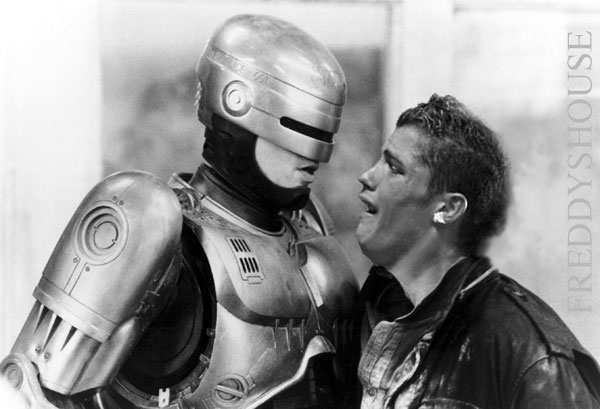
Photoshop round 2

Commandment

Fledgling Freddie
Joined
Jun 25, 2004
Messages
973
Thorwyn[B&Q] said:
This is a rare picture of the young Ronaldo

young_r

thats fucking brialliant! :D

keep up the good work rofl
 

Cozak

Part of the furniture
Joined
Jan 15, 2004
Messages
2,871
Ok I just got photoshop and it is driving me crazy, cant get anything to do what I want to do, basicly I have the 2 images loaded up, I want to crop the ronaldo head from one but the crop tool only lets me select rectangles, I cant figure out how to rotate theh ead so that he is facing the other way and I cant figure out how to get rid of the blue background so that its just the head. Once I have done all that how would I go about getting the head onto the other picture? This is sending me insane.
 

Cylian

Can't get enough of FH
Joined
Jan 17, 2004
Messages
2,336
you got three icons for selecting stuff

- Rectangular (extends to: Eclipse and Single Rows - Right Click the icon)
- Lasso Tool (ext: Polygon and Magnetic)
- Magic Wand

using those and pressing Shift let's you add stuff to you selection, while holding Alt let's you remove areas of your selection.

When you got the parts selected: Edit -> Transform - for scale, rotate, flip etc

then just Edit -> Copy and paste it into the other image. There the selection will first be put into a layer of it's own where you can modify it further if you want.
 

old.Tohtori

FH is my second home
Joined
Jan 23, 2004
Messages
45,210
Since this is a sequal, i thought it's only appropriate to..well...you be the judge :D

ronaldokid9tv.jpg
 

Thorwyn

FH is my second home
Joined
Dec 22, 2003
Messages
4,752
ok.. I`ll try a step by step...

use the magic wand
klick on the blue area
do Select - Invert
do STRG C
click into the target image
do STRG V

Now, the head should be in the new image, as a separate layer. Click "Select all"

then...
if you want to rotate -> Edit -> transform -> Rotate

if you want to mirror -> Edit -> flip hor/ver

Any other manipulation is under Edit -> Transform

hope that helps :)
 

- English -

Resident Freddy
Joined
Apr 7, 2004
Messages
5,263
Thorwyn[B&Q] said:
ok.. I`ll try a step by step...

use the magic wand
klick on the blue area
do Select - Invert
do STRG C
click into the target image
do STRG V

Now, the head should be in the new image, as a separate layer. Click "Select all"

then...
if you want to rotate -> Edit -> transform -> Rotate

if you want to mirror -> Edit -> flip hor/ver

Any other manipulation is under Edit -> Transform

hope that helps :)


whats STRG?
 

- English -

Resident Freddy
Joined
Apr 7, 2004
Messages
5,263
Thorwyn[B&Q] said:
omg.. sorry! :D

STRG = CTRL

the image head is too big tho.. how can i select it whilst ctrl+v in the pic and resize the head, rather than the image
 

Cozak

Part of the furniture
Joined
Jan 15, 2004
Messages
2,871
okej, I got another stupid question :( I need to get rid of some hair from the old persons head which doesnt belong to rondildo, I have been trying to use the spot healing brush tool.. with limited results, it seems to just take random parts of the image and plaster it when I use it.. any tips?
 

Thorwyn

FH is my second home
Joined
Dec 22, 2003
Messages
4,752
go to Edit -> Transform -> scale.... depending on which version of Photoshop you´re using, you´ll find a navigation field for scaling in the edit bar on top of the screen. click the chain icon (Maintain aspect ratio) and enter a value in one of the fields.
 

Thorwyn

FH is my second home
Joined
Dec 22, 2003
Messages
4,752
okej, I got another stupid question I need to get rid of some hair from the old persons head which doesnt belong to rondildo, I have been trying to use the spot healing brush tool.. with limited results, it seems to just take random parts of the image and plaster it when I use it.. any tips?

hm.. this is tricky, because it heavily depends on the image and what you actually want to do with it. I`m using the Clone Stamp Tool quite a lot, but that requires some practice.
click Clone Stamp, make sure that "aligned" in the top bar is UNchecked, then hit ALT and click the region you want to copy/clone from.
 

Ardas Nails

OT Photoshop King
Joined
Feb 27, 2004
Messages
150
Using PS 7 at the moment. CS a big improvement?

Not that it matters much for me. Am far from expert, I just learn as I go along from playing around with it.

Am out of ideas for this pic already :D

gonna play some TFC (that guy from Eurogamers who signed up made me go all nostalgic and play it again)
 

Thorwyn

FH is my second home
Joined
Dec 22, 2003
Messages
4,752
I tested PS 6 and 7 for a while and they both didn´t fit my requirements. For my every day job, I occasionally need to be able to select and manipulate (dodge/burn) single pixels and both versions of PS didn´t do that, they always "aliased" the adjanced pixels as well. In adition, both versions had a pretty bad alpha channel bug, which could be fixed by adding a certain .dll, but it was still annoying.

Apart from the things they have changed, I can´t say that CD is a big improvement over PS7. The functions are almost the same, maybe a little more comfy at some places, but nothing to write home about. Still, CS is unable to save .tgas with a completely black alpha channel.. which is VERY annoying. :)

If you´re happy with PS7, keep it.
 

fettoken

I am a FH squatter
Joined
Jul 18, 2004
Messages
9,640
There is something about that Ronaldo guy that irritates the hell out of me, can´t really put my finger on it.
 

Cozak

Part of the furniture
Joined
Jan 15, 2004
Messages
2,871


Ronaldo on the way to Man U training grounds, My first photoshop.. so go easy :p Was alot of hair and shit to remove :p

(Original)
 

Cylian

Can't get enough of FH
Joined
Jan 17, 2004
Messages
2,336
if you're not sure how much of the head you'll need, copy it all into your image, then add a Layer Mask to it. If you select "Show All" you should have a white box next to your "head" in the layer, click on it, select the brush, then black and paint over the parts you don't need. If you "removed" too much, just select white again. Works with opacity etc too.
 

friky

Fledgling Freddie
Joined
Nov 30, 2005
Messages
741
lol thor u have 2 much spear time , come back 2 daoc
 

Users who are viewing this thread

Top Bottom