Ghost UI problem (aka Fao eggy)

Lollersausage

Banned
Joined
Jan 20, 2006
Messages
206
Well dunno wtf's happened now.. but a new f*cking combat box appeared when i logged on today. So yeah, any idea how to get rid of it?
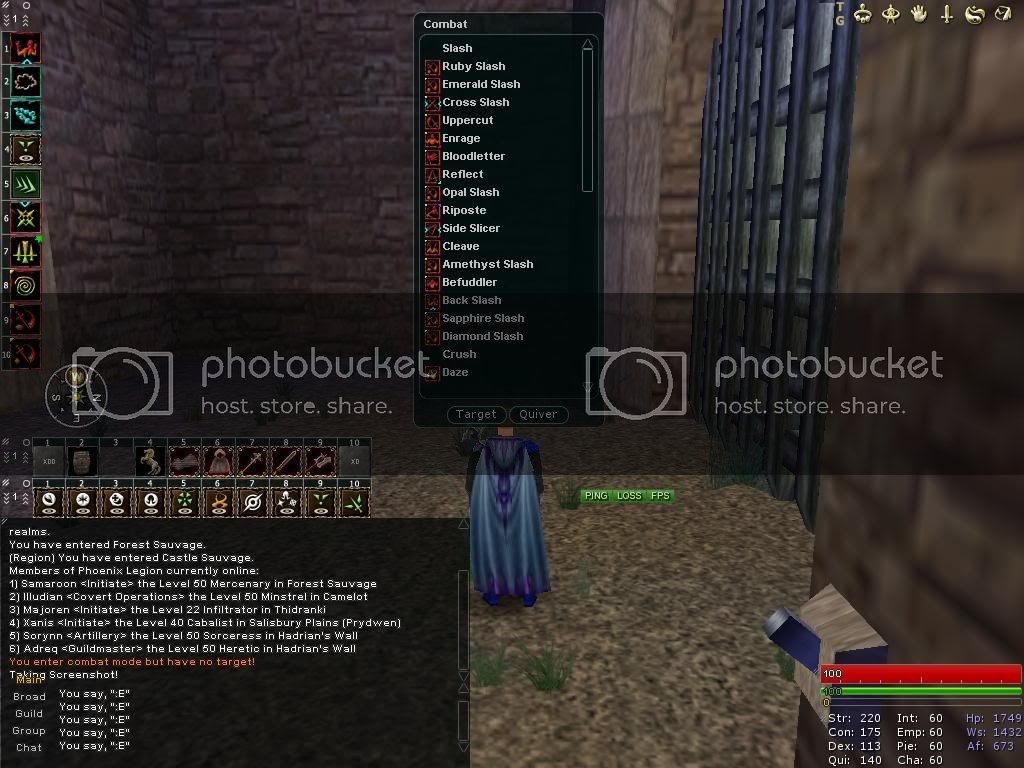

arghfgs.jpg
 

eggy

Fledgling Freddie
Joined
Feb 3, 2004
Messages
5,283
Funny, Beeks asked me the same thing on our forums :eek:

I assume you're using the latest version of Ghost UI? (.g version I think)
 

Ryuno

Can't get enough of FH
Joined
Mar 10, 2004
Messages
434
your using an older version of that ui, or you've tried to fix it yourself.

Just download the latest version and replace the combat_styles file.
 

Lollersausage

Banned
Joined
Jan 20, 2006
Messages
206
Ryuno said:
your using an older version of that ui, or you've tried to fix it yourself.

Just download the latest version and replace the combat_styles file.

Done that, stayed the same.

Done it again, used ToA skin for 2 mins and switched back, and voila :]

cheers for replys though.
 

sxx

Fledgling Freddie
Joined
Jan 24, 2004
Messages
165
Had the same problem, removed the charname-xx.ini and it went away.
 

Yshynsin

Fledgling Freddie
Joined
Oct 31, 2004
Messages
694
What you do is


Load up the default daoc Ui... then the box will appear as a cross, cancel it and it should be gone.

I did this and it's fine now
 

Puppet

Part of the furniture
Joined
Dec 24, 2003
Messages
3,231
It says 'quiver' so more likely then not its the archery quiver for arrows being modified so it shows styles.

Normally you can put the quiver on and off with /quiver. Tried that ?
 

Users who are viewing this thread

Top Bottom