Computer restarting & weird mouse cursor..

Lywon

Fledgling Freddie
Joined
Nov 8, 2004
Messages
111
Lo peoples,

My question is about my mouse and computer. They are action crazy..

First the mouse thing.

When I'm playing DAoC in window (what I usually do), my mouse moves very weirdly sometimes. Cursor is 'lagging' and it moves bit 'drunk' runner.

I've installed newest mouse driver. But didnt work out.. :/ (I got MX 510. Logitech)

And the restarting computer..

When Im playing, computer shut restarts some times. Just normal playing, and TILT! I've no idea why it does that! I should not have any viruses and stuff on my comp, i've scanned. My computer should not over heat, because I got 3-5 fans there running on the full power.

I'm helpess..

If you might know anything, please post.

:)
 

Jaem-

Can't get enough of FH
Joined
Jan 20, 2004
Messages
2,498
Not sure about the mouse, but the computer restarting maybe due to some problem.

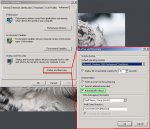
if you right click on My Computer, go to Props and then to the Advanced tab, then click the Startup And Recovery button, there should be a tick box with "Automaticaly Reboot".

Unclick this, next time it may give you a blue screen of death and maybe show you what might be causing this restarting.
 

Wuntvor

Fledgling Freddie
Joined
Jan 23, 2004
Messages
64
My PC had the same restarting problem for ages. After much nashing of teeth and threats to throw it out of the window I discovered that it was down to a bad connection in the power socket in my computer room wall.

Easily sorted but a bugger to track down, could be worth a try :)
 

Mojo

Fledgling Freddie
Joined
Feb 27, 2004
Messages
1,940
Lywon said:
Lo peoples,

My question is about my mouse and computer. They are action crazy..

First the mouse thing.

When I'm playing DAoC in window (what I usually do), my mouse moves very weirdly sometimes. Cursor is 'lagging' and it moves bit 'drunk' runner.

I've installed newest mouse driver. But didnt work out.. :/ (I got MX 510. Logitech)

And the restarting computer..

When Im playing, computer shut restarts some times. Just normal playing, and TILT! I've no idea why it does that! I should not have any viruses and stuff on my comp, i've scanned. My computer should not over heat, because I got 3-5 fans there running on the full power.

I'm helpess..

If you might know anything, please post.

:)

I spoke to someone who had a similar problem when they installed the logitech utilities for their series of mice, removing the utilities but not the drivers fixed the problem.

(if in doubt remove anything logitech in add/remove porgrams and just let your os pick up and install the mouse.
 

Mojo

Fledgling Freddie
Joined
Feb 27, 2004
Messages
1,940
I just looked up the MX510 and the pics i saw look like the mouse in question, and iirc the person who had the prob had it connected to a dell inspiron USB1.0 port just as a point of refrence.
 

Neffneff

Fledgling Freddie
Joined
Oct 22, 2004
Messages
2,064
if using USB connection on mouse, you can try the PS2 converter usually shipped with mice if you have it. usually fixes laggy mouse probs.
 

Lywon

Fledgling Freddie
Joined
Nov 8, 2004
Messages
111
Not using USB mouse. Haven't tryed uninstall drivers..

I'm sure it's not my power socket. 230 AC coming pure here in Finland.

Didnt find that option Jeam.

Btw, forget to tell my computer spec:

AMD Athlon 2400+
Radeon 9600 XT 128MB, Club 3D
1GB 400Mhz memory
Win 2k

Still having lagging mouse, and computer just restarted once again middle of game. I will have to try unistall that driver crap and stuff, if it would work. But still guessing what's the matter of restarting computer..

Knowledge is power.. what I don't have at the moment :)
 

Dimmer

Fledgling Freddie
Joined
May 9, 2004
Messages
346
Well personaly I had trouble with computer halt and restart and after a brief error search I found out it was my mainboard RAM socket that was corupt
 

Jaem-

Can't get enough of FH
Joined
Jan 20, 2004
Messages
2,498
Lywon said:
Didnt find that option Jeam.

This is from win 2k at work, but in XP its in a simular place, what it does is tell it not to reboot by itself when something mega bad happens. :)
 

Attachments

  • autorestart.jpg
    autorestart.jpg
    88.4 KB · Views: 24

Lywon

Fledgling Freddie
Joined
Nov 8, 2004
Messages
111
It's already like the picture shows me.

I take the unactive? (take the 'V' off it? :D)
 

Sycho

Can't get enough of FH
Joined
Dec 22, 2003
Messages
2,255
When a pc reboots it's usually mainly caused by these:

-Cpu voltage isn't correctly setted.
-Memory FSB too high or has many errors.
-Pc is being overheated.
-Wrong drivers installed for new hardware OR old files remaining from previous drivers causing conflicts.

There is other problems that cause pc to reboot but these are generally the most common, in your case i am very sure it's drivers causing this either with the mouse or gfx card.If it is the gfx card look out for driver cleaner 3 and use it in safe mode when removing files, just follow the instructions then you will be fine.After that has been cleaned try the newest gfx drivers out for your card.

Forgot to add, i had same problem in WoW, mouse went funny and pc rebooted randomly, sorted it out by using driver cleaner 3.
 

Jaem-

Can't get enough of FH
Joined
Jan 20, 2004
Messages
2,498
Lywon said:
It's already like the picture shows me.

I take the unactive? (take the 'V' off it? :D)

A yes, unclicked, if its like a driver/hardware prob(like Sycho said it might be), it should tell you the thing that caused it when it goes blue screen(instead of reboot) on you.
 

Lywon

Fledgling Freddie
Joined
Nov 8, 2004
Messages
111
Sycho said:
When a pc reboots it's usually mainly caused by these:

-Cpu voltage isn't correctly setted.
-Memory FSB too high or has many errors.
-Pc is being overheated.
-Wrong drivers installed for new hardware OR old files remaining from previous drivers causing conflicts.

There is other problems that cause pc to reboot but these are generally the most common, in your case i am very sure it's drivers causing this either with the mouse or gfx card.If it is the gfx card look out for driver cleaner 3 and use it in safe mode when removing files, just follow the instructions then you will be fine.After that has been cleaned try the newest gfx drivers out for your card.

Forgot to add, i had same problem in WoW, mouse went funny and pc rebooted randomly, sorted it out by using driver cleaner 3.

I now installed driver cleaner and used it. Downloading a newest driver now. Hope this will work.

I still think it's not the PC overheating, because of loads of fans. And 1,9 GHz CPU should not be much. I have tryed to overcloack it to 2,5 GHz and still worked..

Not sure about that CPU voltage. It should be okay (even last time when I checked BIOS).

Still checking the drivers what could be wrong ones.

Thanks for info mate, gived me a clue what could be a matter.

*searcing, searching*

:)
 

Sycho

Can't get enough of FH
Joined
Dec 22, 2003
Messages
2,255
Just make sure all the ATI driver files are removed using driver cleaner before installing new driver and also sometimes it creates a folder for your drivers under programme files section which you could also delete too if you have one there.
 

Lywon

Fledgling Freddie
Joined
Nov 8, 2004
Messages
111
I got now new drivers of my GFX. Everything looks fine to me atm. Haven't restarted yet.

Mouse.. this freeking mouse is in game still lagging cursor. Easy to target a enemy or move items on invetory when mouse just takes little jumps sometimes.

I've unistalled Logitech drivers and softwares and every stuff I just could found. Didn't work. Still lags.

Arghie. Hope that restarting problem is now solved, because in some hours will be a ML raid and I wouldn't want 'LDs' because of my stupid computer :/

If anyone know anything about this mouse problem, tell me about it..
 

Users who are viewing this thread

Top Bottom