
Question Bit of photo touchup advice needed

cHodAX

I am a FH squatter
Joined
Jan 7, 2004
Messages
19,742
I have a high res scan of a logo that I need to get cleaned up, the image is greyscale but sadly my scanner is a bit old and dusty plus the original image isn't in brilliant condition. What I am left with is not fit for what I need to do so I need to clean the image up somehow ideally using paint.net but I don't have a clue where to start. All I know for sure is that I am not going to spend hours doing it painstakingly by hand if I can help it. Can anyone advise?

If it helps here is a lower res version of the image...
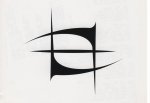
mw2.jpg

The original is 5k x 3.5k or so
 

ST^

Can't get enough of FH
Joined
Dec 22, 2003
Messages
2,351
You can probably do a half decent job by using the "magic wand" selection tool (I'm hoping paint.net has that, I've never used it myself).

Use a tolerance of about 8 (and use anti-aliasing if paint.net has it), click inside the black to bring up the selection. Then make a new layer and fill your selection with black. Then make another layer underneath that and fill it completely with white (or fill your original layer with white).
 

Thorwyn

FH is my second home
Joined
Dec 22, 2003
Messages
4,752
If you want a quick job, use the magic wand. With such a high contrast, it should get you a decent result.
If you want to doa proper job, start Photoshop and make a vector image of the shape. That way you´ll be able to scale it up and down however you want.
 

fl3a

Can't get enough of FH
Joined
Jan 2, 2004
Messages
1,989
redo it as a vector image by tracing the lines is the first thing i thought about. probably easiest to get a good result that way as well
 

Access Denied

It was like that when I got here...
Joined
Jun 14, 2006
Messages
2,552
Looks like a symbol out of a game I've played at some point, very familar...
 

cHodAX

I am a FH squatter
Joined
Jan 7, 2004
Messages
19,742
Looks like a symbol out of a game I've played at some point, very familar...

Nah it was the logo used by a band called Mourning Widows about a decade ago, my brother and myself are big fans so we wanted to get a high res but totally clean image to be able to print off or use for other things.

I have tried some of the advice from above, sadly none on them gave the results I was after, I think that might be down to paint.net though. Haven't tried the vector stuff as I wouldn't have a clue where to start on that, my photo editing skills are totally nil and figuring out magic wand was enough of a challenge. :p
 

Garaen

One of Freddy's beloved
Joined
Dec 27, 2003
Messages
985
I'm no Photoshop Guru Cho but i've had a crack for ya

Uploaded with ImageShack.us

The black edge seems a bit pixilated but i'm not sure how to smooth it out
 

cHodAX

I am a FH squatter
Joined
Jan 7, 2004
Messages
19,742
That isn't a bad start at all bud thanks, will see what I can do with that. :)
 

Users who are viewing this thread

Top Bottom